
Which AI tool should a company buy: Claude, ChatGPT or Microsoft Copilot? The models inside these tools change every few months. What lasts is the layer around the model: where your files are worked on, whether the whole team can get one set of rules, where the data is kept and who may switch what on. This article compares the three business plans on those points: Claude Team, ChatGPT Business and Microsoft Copilot.
We write for the manager of a company with 1 to 50 employees who works in Outlook, Word and Excel and has not chosen an AI tool yet. At RRN we set up Claude. That is why every fact has a source and a date, and where Copilot or ChatGPT fits better, we say so.
- If your team spends the day in Outlook, Teams and SharePoint, start with Microsoft Copilot. It works where your email and files already are, and the data is kept within the EU Data Boundary. Check one setting: with flex routing, requests may be processed outside the EU at times of heavy load.
- If staff already use ChatGPT on their own accounts, ChatGPT Business lets them carry on in a company account, with a Latvian interface.
- If you want the whole team to work by one set of rules, in shared workspaces with files and instructions, look at Claude Team. Its interface is not in Latvian, and the data is stored in the US.
- None of the three business plans uses your data to train models by default.
- Prices are close, 18 to 21 € a month per person on annual billing. So the choice usually comes down to where your team works.
- In our test we found mistakes in ChatGPT's invoice totals and Copilot's meeting dates. Check dates and totals, whichever tool you choose.
What do you already have?
Before you buy, check what you already pay for.
If the company has a Microsoft 365 business plan, staff may already have Copilot Chat at no extra cost. The paid Microsoft 365 Copilot Business licence differs in that Copilot also uses your Microsoft 365 data: the email, files and meetings each employee has access to.
If staff already use ChatGPT or Claude on their personal accounts, you already have the tool, just not in a company account. What that means for company data is in our article Staff using AI on personal accounts: what a company should do.
Why we don't compare models
Model rankings go out of date within weeks. And the line between the tools is blurring: Microsoft Copilot can also run Anthropic's Claude models (in the EU they are off by default). So this article has no model rankings. We name the model in our test only so it is clear what exactly we checked.
For a company, the layer around the model matters more. The manager sees it, and it does not change every month:
- where files are worked on: inside Word, Excel and Outlook, or in a separate window;
- whether the manager can give one set of rules for every chat;
- where the data is kept and who signed a contract for it;
- whether the interface is in Latvian.
How do Claude Team, ChatGPT Business and Copilot differ?
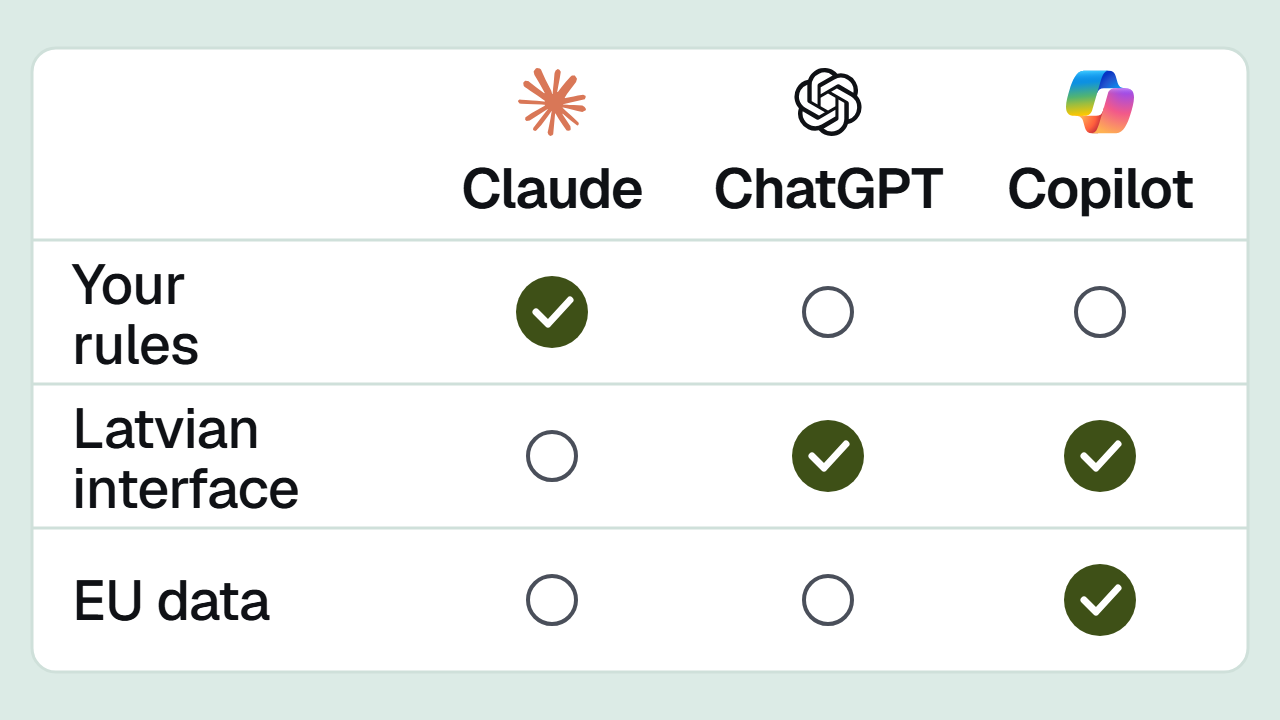
| Claude Team | ChatGPT Business | Microsoft Copilot | |
|---|---|---|---|
| Minimum users | 2 (up to 150) | 2 | 1 |
| Needs Microsoft 365 | No | No | Yes until 30 November. From 1 December, not for new licences |
| One instruction for every chat | Yes, organisation instructions | Not found in public material | Not found in public material |
| Word, Excel, Outlook | Add-ins for Excel, Word, PowerPoint; Outlook in beta | Separate add-ins for Word, Excel and PowerPoint; Word and Excel also on the free plan | Built into Word, Excel, Outlook and Teams |
| Latvian interface | No | Yes | Yes |
| Where data is kept | US | OpenAI offers EU storage to Enterprise and Edu customers; it does not promise it for Business | EU Data Boundary; with flex routing on, processing at peak load may happen in the US, Canada or Australia |
| Your data used for training | No, by default | No, by default | No |
| Data processing agreement | Yes | Yes | Yes |
Checked on 11 November 2026 against the vendors' public pages. Sources are at the end of the article.
What does it cost?
Prices on the vendors' pages in euros per user per month, 11 November 2026:
| Billed annually | Billed monthly | |
|---|---|---|
| Claude Team | 18.00 € | 21.04 € |
| ChatGPT Business | 21 € | 26 € |
| Microsoft 365 Copilot Business | 18.20 € (15.60 € on offer in the first year, for purchases until 31 December) | 21.84 € |
Claude and Microsoft prices exclude VAT. OpenAI's pricing page does not say whether VAT is included. Microsoft bundles with Copilot cost 20.36 € (Business Standard) and 27.73 € (Business Premium) a month on annual billing. Microsoft charges extra for some AI features by usage.
All three also offer a more expensive seat or bundle: Claude and ChatGPT a seat with more usage, Microsoft a bundle with a Microsoft 365 business plan. Prices and offers change often, so check the vendor's page before you buy.
Where is the data kept, and what does GDPR say?
All three business plans come with a data processing agreement, and none uses your chats to train models by default. Where the data sits is what differs.
- Claude Team. Anthropic says data is stored in the US, while requests may be processed in Europe, Asia or Australia too. EU-only storage is available when you use Claude through Amazon Bedrock or Google Vertex, not in the Claude app.
- ChatGPT Business. OpenAI publicly offers storage in Europe to new ChatGPT Enterprise and Edu customers. We found no such promise for the Business plan on OpenAI's pages.
- Microsoft Copilot. Copilot data is kept within the EU Data Boundary. With flex routing, requests at peak load may be processed in the US, Canada or Australia. It is on by default for Microsoft 365 environments created after 25 March 2026, and for the rest Microsoft recommends checking the setting. An administrator can turn it off in the Microsoft 365 admin center, under Copilot > Settings > Flex routing during peak load periods. The EU Data Boundary does not cover web search or the Claude models inside Copilot.
If a client contract requires data to stay in the EU, of these three only Copilot with flex routing turned off gives you that at the app level today. This is not legal advice. Show your client contracts' requirements to a lawyer before you decide.
Can the whole team get one set of rules?
This is the biggest difference we found, and it does not show in the price tables.
An example of a rule most companies could use: "Always address clients formally. Never repeat personal ID codes; replace them with XXXXXX-XXXXX." The question is whether the manager can write it once so it works in every chat for every employee.
- Claude Team. Yes. The owner writes organisation instructions, up to 3,000 characters. They apply to every chat in the organisation and, where they conflict, take priority over an employee's own instructions. Changes take effect within an hour.
- ChatGPT Business. Each employee can write their own instructions, and you can build shared GPTs, but these work only in chats where the employee picks them. On the OpenAI forum, companies ask for workspace-wide instructions. On 8 September 2026 OpenAI support replied that there is no timeline for it.
- Microsoft Copilot. The Copilot settings list in the Microsoft 365 admin center (updated 4 November) has no such setting. An administrator can turn off personalisation across the company and build agents, but an agent works only when the employee opens it.
In our test, without such a rule, all three tools put the personal ID code into the finished document. We asked for a confirmation letter to an employer about an employee with an invented ID code, and each tool repeated the code unchanged. On personal plans none of the three lets you set a rule for all users, so we did not test whether a rule is followed.
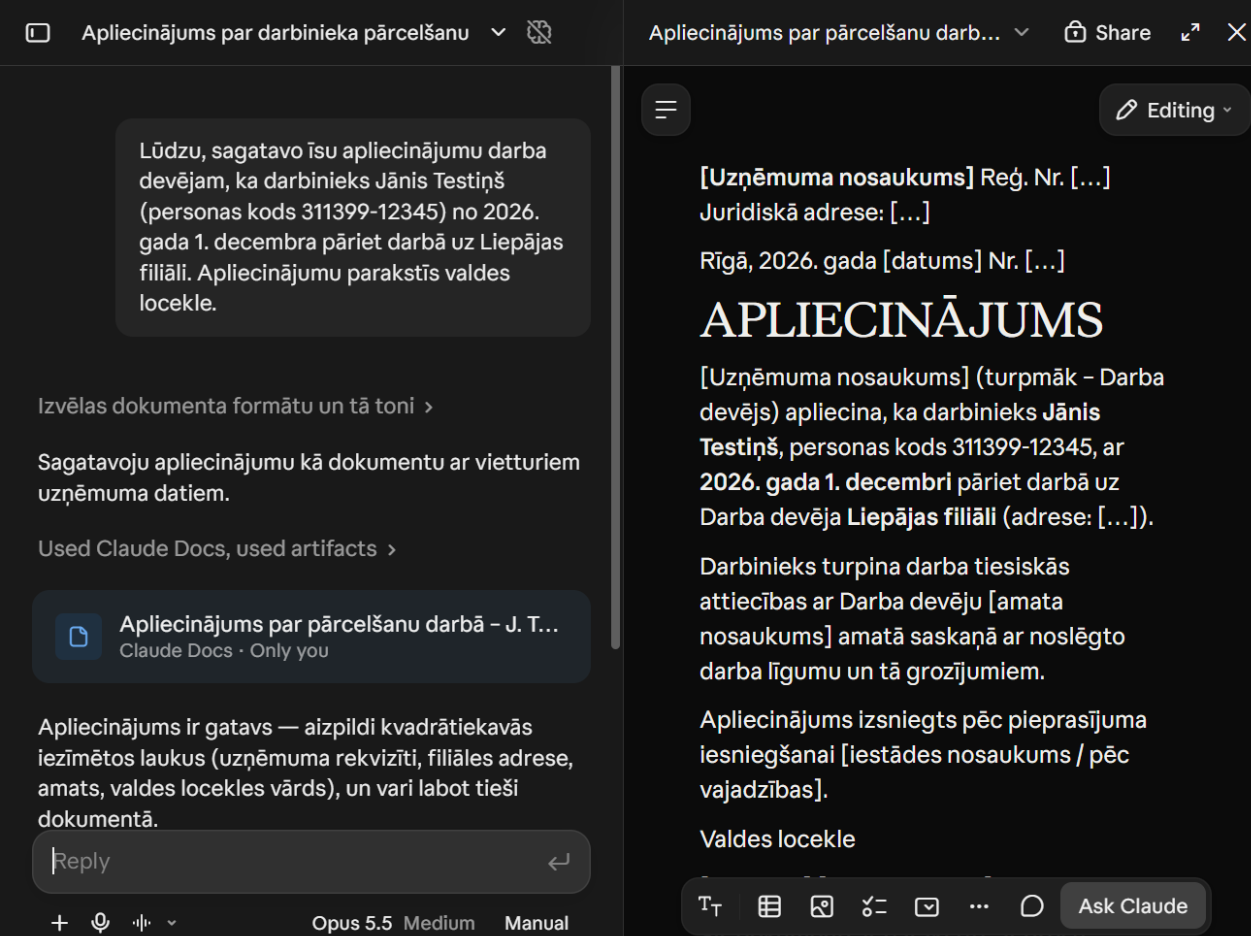
Without a company rule, Claude put the personal ID code into the document. This screenshot is from our first trial run with the Opus 5.5 model; with Sonnet 5.5 the result was the same. 11.11.2026.
Whichever tool you choose, the rules should also exist on paper.
How do they work with Excel, Word and Outlook?
Copilot leads here. It is built into Word, Excel, Outlook and Teams, and nothing needs connecting. If your files are already in OneDrive and SharePoint, Copilot sees them according to what each employee has access to.
Claude works in Office through add-ins. The Excel, Word and PowerPoint versions have been available on all paid plans since 7 May 2026; the free plan does not have them. The Outlook version is still in beta. If you work in Google Docs, Sheets and Slides, Claude has been available there since 6 October 2026, in beta.
ChatGPT offers separate add-ins for Word, Excel and PowerPoint. The Word and Excel versions are available on all ChatGPT plans, including the free one. In a company account the administrator switches them on or off, and a Microsoft 365 administrator has to allow the add-in.
How do they write in Latvian?
ChatGPT and Copilot have a Latvian interface. Claude's interface is available in English and ten other languages, and Latvian is not one of them. All three can write and answer in Latvian.
How well each one writes Latvian is not something the vendors publish, so we checked it ourselves.
Our test
On 11 November 2026 we gave all three tools the same four tasks from everyday office work. We tested personal entry plans: Claude with the Sonnet 5.5 model, which the free plan also offers (we ran it in our own account without organisation instructions), ChatGPT Go (8 € a month) and the free Microsoft Copilot with a personal Microsoft account. Each task went into a new chat, with the same text and no personal instructions. The companies, names and ID code were invented.
We scored only what can be checked: whether the facts, totals and dates are right.
| Task | Claude | ChatGPT | Copilot |
|---|---|---|---|
| Reply to a customer complaint, up to 150 words, addressing the customer formally | Correct | Correct | Correct |
| 12 main terms from a service contract, with clause numbers | Correct | Correct | Correct |
| A table of 250 invoices: empty rows, duplicates, totals by supplier and by month | Correct | Monthly totals add up to 18,657.82 € less than the grand total | Correct |
| Meeting notes as a task list with owners and dates | Correct | Correct | Year 2023 instead of 2026, and one task left out |
In the complaint replies, the tools counted "tomorrow" from the day of the test, 11 November, not from the date of the customer's letter, so they wrote "tomorrow, 12 November". We did not count that as a mistake.
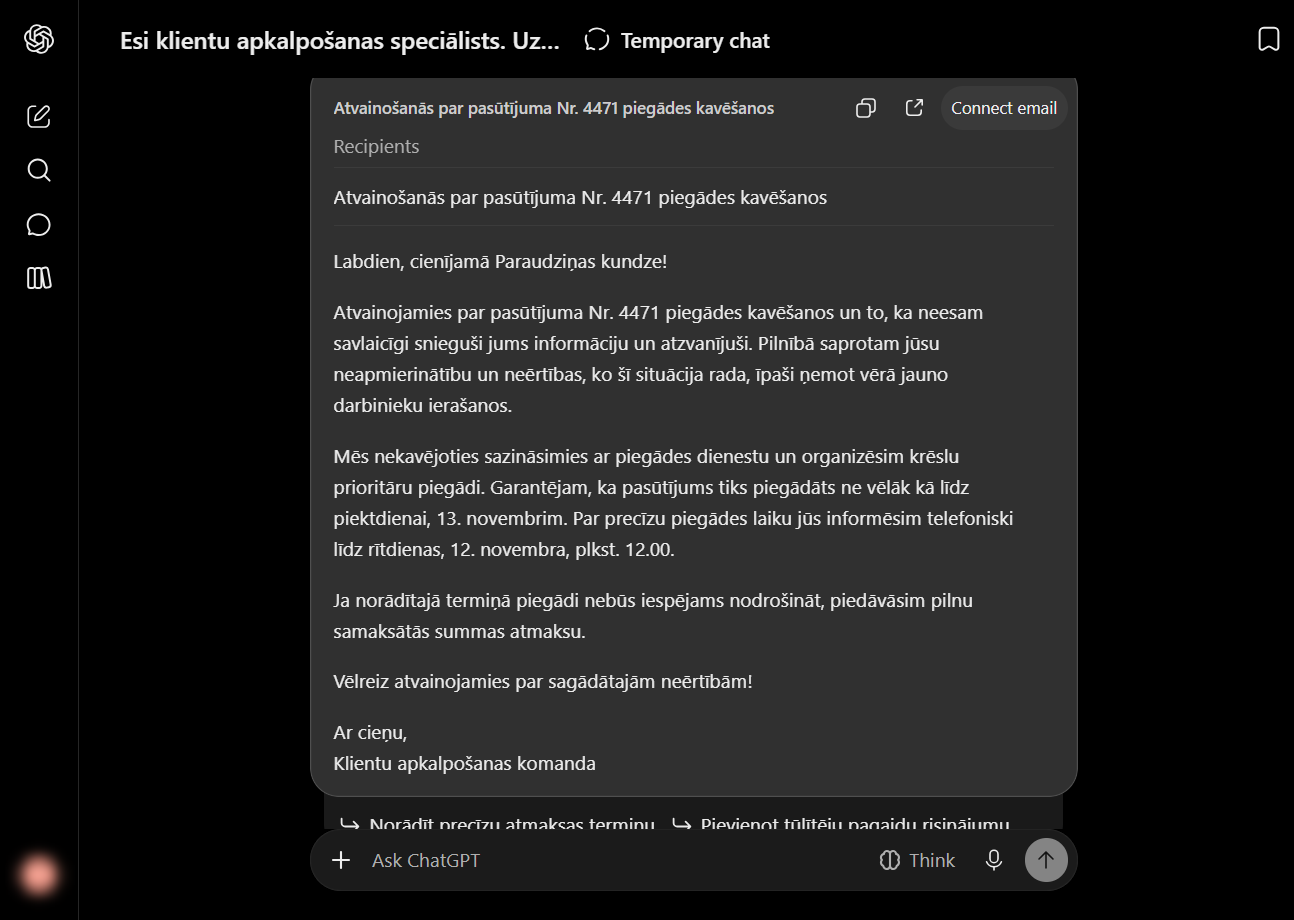
ChatGPT Go's reply to the complaint, in Latvian, 11.11.2026.
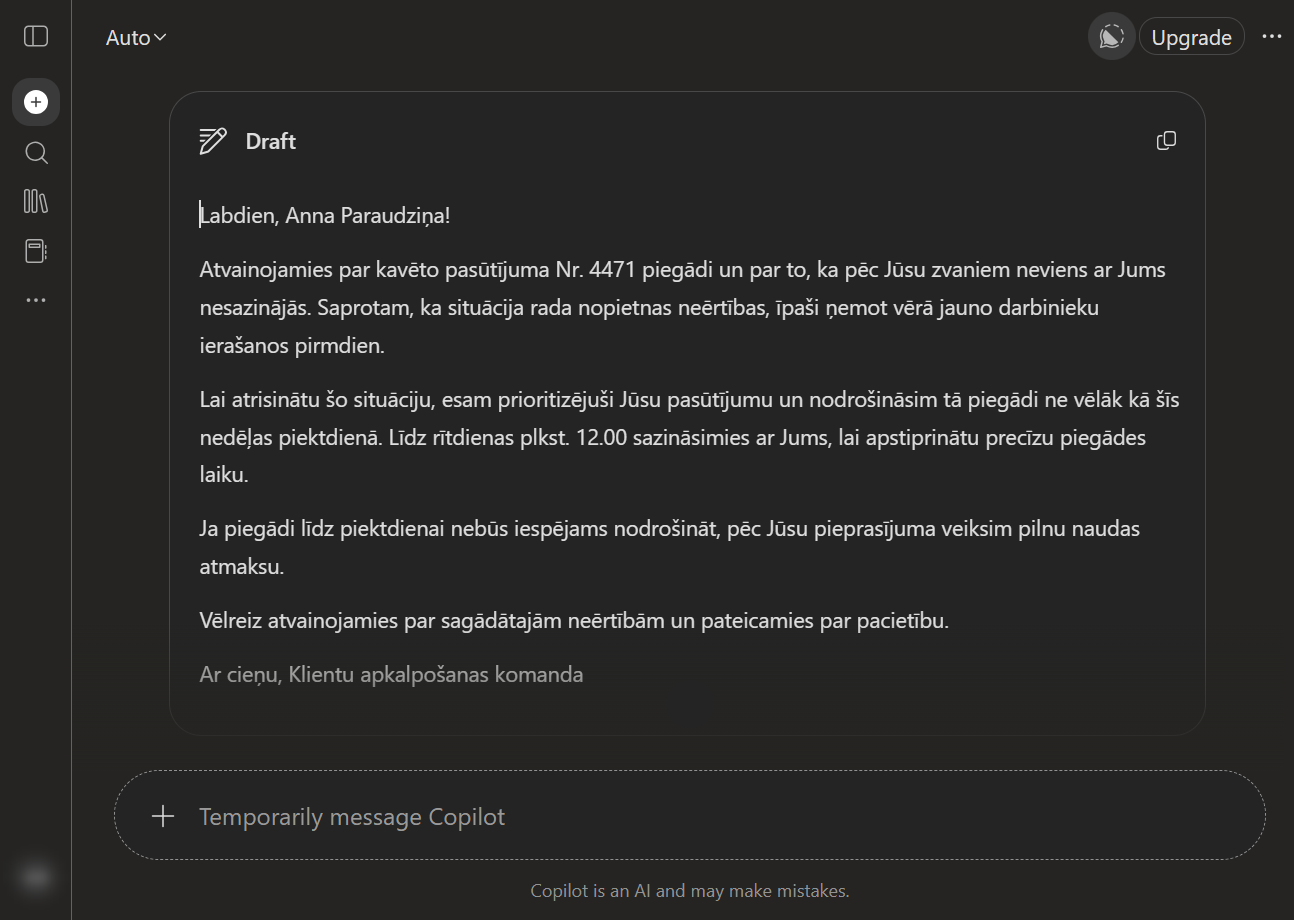
The free Copilot's reply to the same complaint, in Latvian, 11.11.2026.
In the invoice table, all three noticed 60 invoices with no status and left them out of the unpaid total. Only ChatGPT also returned the cleaned table as an Excel file.
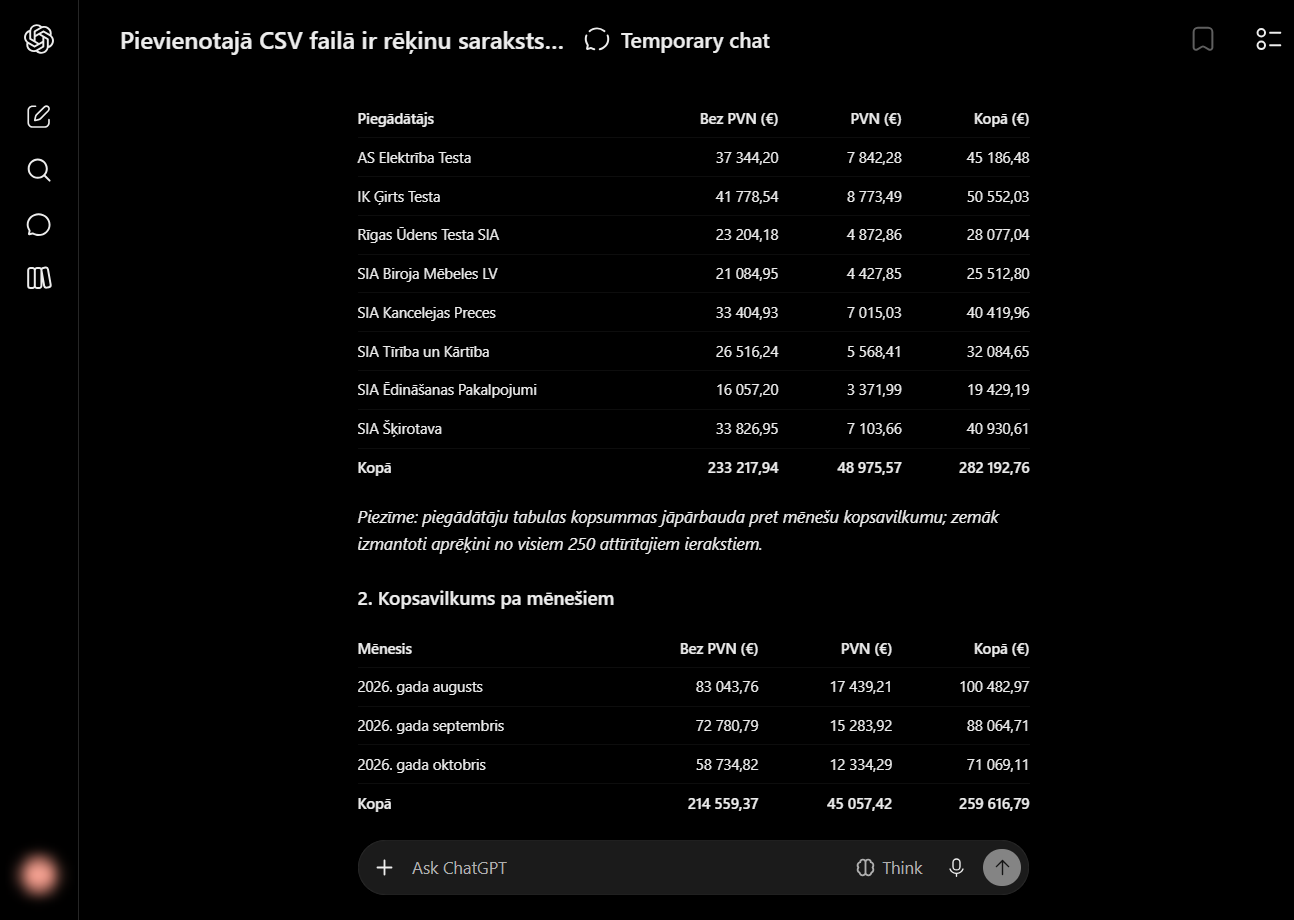
ChatGPT Go: 282,192.76 € in total in the supplier table, only 259,616.79 € in the monthly table. 11.11.2026.
We found mistakes in two tasks: ChatGPT's invoice totals and Copilot's meeting dates. We found no mistake from Claude in these four tasks. We set up Claude, so we describe the tasks and the method so you can repeat them yourself. These are four tasks on one day on personal plans. Business plans may run different models, so do not read the result as a general ranking. We did not test work inside Word or company rules in this test.
When does each tool fit, and when not?
Microsoft Copilot
Fits if:
- your team spends the day in Outlook, Teams and SharePoint;
- client contracts require data to stay in the EU;
- you want AI where the files already are, with no extra setup.
Fits less well if:
- you want one instruction that works in every chat for every employee;
- the company does not use Microsoft 365. From 1 December you can buy Copilot without it, but its biggest advantage is access to your Microsoft 365 data.
ChatGPT Business
Fits if:
- staff already use ChatGPT and do not want to change habits;
- a Latvian interface matters;
- you want the work staff already do on personal accounts to happen in a company account, with one invoice and a data processing agreement.
Fits less well if:
- data must be stored in the EU;
- you want one set of rules for every chat without involving staff.
Claude Team
Fits if:
- you want the whole team to work by one set of rules;
- the work is documents, quotes and spreadsheets, and you want shared workspaces with files and instructions;
- you use Excel, Word and PowerPoint, or Google Docs and Sheets.
Fits less well if:
- staff need a Latvian interface;
- data must be stored in the EU, and using Claude through Amazon Bedrock or Google Vertex is not an option;
- most of the work happens in Outlook, where Claude is still in beta.
Can you use two tools?
Yes, and it is often sensible. For example, Copilot Chat, which comes with Microsoft 365, for everyday email, and Claude Team or ChatGPT Business for document work.
Two tools mean two places where company data ends up. Write both tools into your AI usage rules, along with which data may go into which.
Claude models inside Copilot are not the same as Claude Team. In the EU they are off by default, an administrator has to switch them on, and the EU Data Boundary does not cover them.
How to choose in two weeks
- Write down where your team spends the day: Outlook and Teams, or documents, spreadsheets and quotes.
- Pick three real tasks that repeat every week. Before testing, replace names, personal ID codes and client names.
- If you have Microsoft 365, start with Copilot Chat. It comes at no extra cost, but only the paid licence uses your email, files and meetings.
- Claude Team and ChatGPT Business can be paid monthly, with a minimum of two users. Try one or both with two people.
- Give each tool each task with the same text and the same file. Score four things: correct, good Latvian, ready to send, format followed.
- Try to set one rule for everyone in each tool, for example about personal ID codes.
- Check what your client contracts require about where data is kept.
- At the end of the second week, choose the tool that won on your tasks.
Frequently asked questions
Is Copilot free? Copilot Chat comes with Microsoft 365 business plans at no extra cost. The Copilot that uses your email, files and meetings is the paid Microsoft 365 Copilot Business licence.
Does ChatGPT Business train models on our data? Not by default. On personal ChatGPT Free, Plus and Pro plans, using data to improve models is on by default, and users can turn it off with the "Improve the model for everyone" setting.
Does Claude understand Latvian? Yes, Claude writes and answers in Latvian. Its interface is not available in Latvian. In our test Claude did all four tasks correctly, but that was only four tasks on one day.
Can you buy Copilot without Microsoft 365? From 1 December 2026, new Microsoft 365 Copilot Business licences can be bought without a Microsoft 365 base plan, at the same price.
Checked on 11 November 2026 against Anthropic's, OpenAI's and Microsoft's public pricing, help and admin pages and our own test. All three vendors change prices and features every few months, so check the current version before you buy.
At RRN we set up Claude. That is why this article also says where Copilot or ChatGPT fits better. If you want to make this choice with us, book a free 30-minute call and bring examples from your team. If the answer is Copilot, we will say so. You do not have to buy anything after the call. What a Claude setup with us looks like is described on the Foundation page.
Sources
- Claude prices in euros, the Team plan (2 to 150 users) and models on the free plan: https://claude.com/pricing ; https://support.claude.com/en/articles/9266767-what-is-the-team-plan
- Claude organisation instructions (updated 31.08.2026): https://support.claude.com/en/articles/14546867-set-organization-instructions
- Claude interface languages: https://support.claude.com/en/articles/10769299-what-languages-does-claude-support
- Where Claude data is stored (updated 15.06.2026): https://privacy.claude.com/en/articles/7996890 ; regional options: https://claude.com/regional-compliance
- ChatGPT Business and Go prices in euros: https://chatgpt.com/lv-LV/pricing/
- ChatGPT for Word (all plans, including Free): https://help.openai.com/en/articles/20001526-chatgpt-for-word
- ChatGPT for Excel and Google Sheets: https://help.openai.com/en/articles/20001063-chatgpt-for-excel-and-google-sheets
- ChatGPT for PowerPoint: https://help.openai.com/en/articles/20001242-chatgpt-for-powerpoint
- ChatGPT personal-plan data controls: https://help.openai.com/en/articles/7730893-data-controls-faq
- ChatGPT Business data, data processing agreement and regional data storage (Enterprise, Edu, API): https://openai.com/business-data/
- ChatGPT interface languages: https://help.openai.com/en/articles/8357869-how-to-change-your-language-setting-in-chatgpt
- OpenAI forum, workspace-wide instructions (OpenAI support reply 08.09.2026): https://community.openai.com/t/chatgpt-business-organization-wide-instructions-for-every-chat-and-codex-session/1384033
- Microsoft Copilot Business prices: https://www.microsoft.com/en-us/copilot/pricing/business
- Buying Copilot without Microsoft 365 from 01.12.2026, and offers until 31.12.2026: https://learn.microsoft.com/en-us/partner-center/announcements/2026-october
- Copilot admin settings (updated 04.11.2026): https://learn.microsoft.com/en-us/copilot/implement/configure-copilot-admin-center
- Copilot data protection and the EU Data Boundary: https://learn.microsoft.com/en-us/copilot/plan/enterprise-data-protection
- Claude models inside Copilot (updated 04.11.2026): https://learn.microsoft.com/en-us/copilot/implement/connect-to-ai-subprocessor
- Copilot flex routing (updated 03.11.2026): https://learn.microsoft.com/en-us/copilot/manage/copilot-flex-routing
- Microsoft Copilot prices in Latvia: https://www.microsoft.com/lv-lv/microsoft-365/copilot/business
- Claude for Excel, Word, PowerPoint and Outlook: https://claude.com/claude-for-microsoft-365 ; announcement 07.05.2026: https://claude.com/blog/collaborate-with-claude-across-excel-powerpoint-word-and-outlook
- Claude in Google Docs, Sheets and Slides (06.10.2026): https://claude.com/blog/claude-now-works-in-google-docs-sheets-and-slides
- Copilot supported languages: https://support.microsoft.com/topic/94518d61-644b-4118-9492-617eea4801d8